This free analyzer will scan the EBS volumes in your AWS account to ensure they are using the most cost-effective volume type for your workload. When the analysis is complete, you will receive an email with a detailed report showing potential savings and recommendations.
Note: This tool is designed to scan a single AWS account. Our advanced analyzer tool can scan multiple accounts across an AWS Organization. To use our advanced tool, please book an appointment with The Cloud Cost Guru.
The EBS Analyzer uses a CloudFormation stack to deploy a Lambda function that scans your EBS volumes. The function analyzes volume usage patterns and recommends the most cost-effective volume types based on your actual workload requirements.
Click the button below to launch the CloudFormation stack in your AWS account:
This should open a page similar to this:
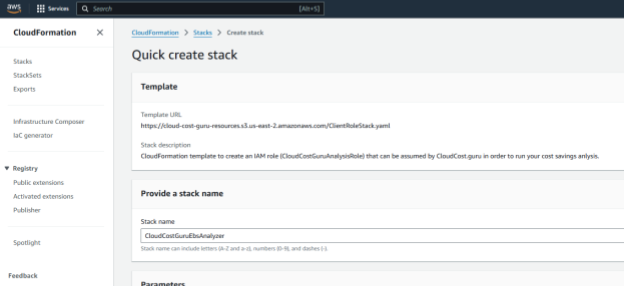
Depending on your security requirements, you may need to provide an IAM role. This is unlikely for most users, but if your org requires it please provide a role that has iam:CreateRole and iam:AttachRolePolicy permissions.
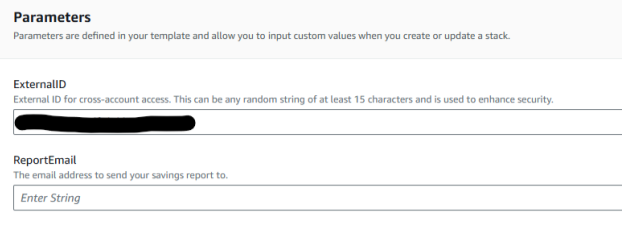
Click "Create Stack" and wait for the deployment to complete. Once finished, the analyzer will automatically scan your EBS volumes and send you a detailed report via email.
The CloudFormation stack creates the following resources:
All resources are created with least-privilege permissions and can be easily removed by deleting the CloudFormation stack.

Our EBS Analyzer is part of a suite of cost optimization tools designed to help you reduce AWS spending without sacrificing performance.
The analyzer examines:
Get started today and discover how much you could be saving on EBS costs!
Our team of experts can help you optimize your entire AWS infrastructure, not just EBS volumes.
Contact Us